Add Person Schema to a Profile Page Over Coffee
By Ted Fay · March 18, 2026
Add Person Schema to a Profile Page Over Coffee
I added Person schema to my profile page in the time it took to finish a cup of coffee. The implementation is fifteen minutes of focused work, and most of that is filling in a form.
This is the third article in a series. Article one made the case for how an executive's profile page is often a blind spot for search engines and AI systems. Article two walked through what content belongs on that page. This one covers the implementation. The code will be ready to add to the site before the article is finished.
What JSON-LD Is (The Version That Matters Here)
JSON-LD is a small block of structured code that lives on a page and tells search engines exactly who the person is, what they do, and what entity they represent, in a format that requires no interpretation.
The profile page already has text. Search engines and AI systems read that text. But natural language requires inference. JSON-LD removes the inference. Instead of asking Google to figure out that "Ted Fay" is a person, that person works at "2 Find Marketing," and that "2 Find Marketing" is a marketing consultancy, the schema states it directly. In a format explicitly designed for machine reading. Additionally, the structured data in schema is read more quickly and efficiently, and is easily linked as an anchor of content to internal and external pages.
Google's Profile Page documentation describes how this structured data can influence how the profile appears in search results and how the entity is understood across the knowledge graph. That documentation exists because Google built support for it. The tooling is not speculative.
Get 80 Percent Done in Five Minutes
You do not need to write this code by hand. Aubrey Yung's Person Schema Generator builds the structure for you.
Bring these fields to Audrey's form. You likely gathered them after the prior article:
- Full name and job title
- Employer name and site URL
- A two or three sentence bio
- The executive's LinkedIn URL
- The canonical URL of the profile page (the page where this schema will live)
- A link to the executive's headshot
Fill in the fields. Copy the output. It will look roughly like this:
{
  "@context": "https://schema.org",
  "@type": "Person",
  "name": "Ted Fay",
  "jobTitle": "Founder",
  "worksFor": {
    "@type": "Organization",
    "name": "2 Find Marketing",
    "url": "https://www.2findmarketing.com"
  },
  "url": "https://www.2findmarketing.com/about/ted-fay",
  "sameAs": [
    "https://www.linkedin.com/in/tedfay"
  ]
}
That is a solid starting point, and for many sites, it is enough to begin.
The 20 Percent That Is Worth Adding
The generator handles the required fields. A few additions make the schema more useful for entity recognition. None require technical skill. You are editing a text block.
sameAs is where the compounding happens. This field accepts a list of URLs that confirm the executive's identity across the web: LinkedIn, board member and advisory listings, speaker and presenter profiles at conferences, byline pages on publications where they have contributed, organizational directory listings. Each additional URL strengthens the signal connecting "Ted Fay the person" to "Ted Fay the entity in the knowledge graph." Add every authoritative one that exists. The company's about page belongs in the Organization schema, not here.
knowsAbout matters more for executives who also publish or speak. For someone with a byline, it lets you declare areas of expertise as topics rather than keywords: "B2B demand generation," "content marketing strategy," or "organizational change management" are examples. For an executive who does not primarily create content, this field carries less practical weight. I am not aware of a published study confirming exactly how AI systems weight it, but it is a direct signal in a format designed for this purpose.
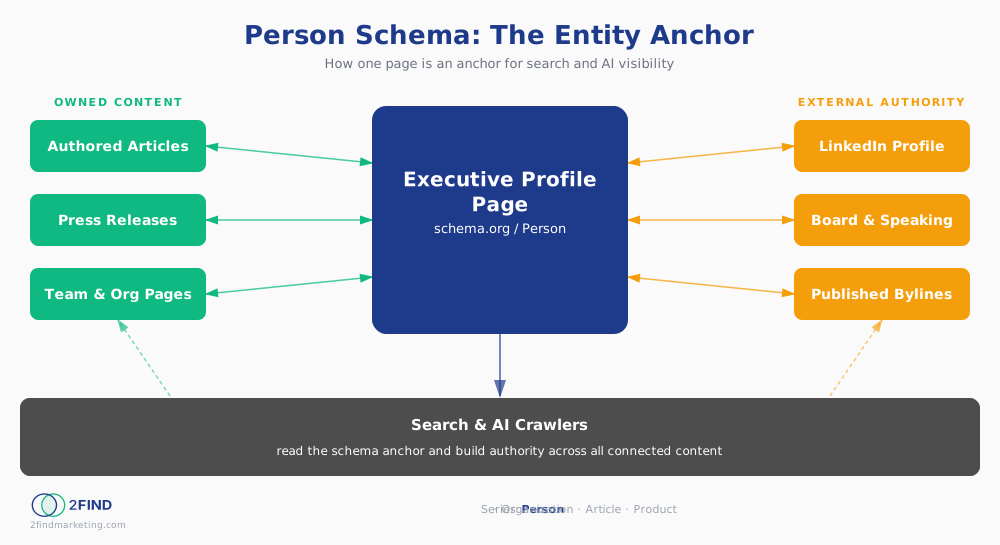
The connections need to run in both directions, and they extend beyond authored articles. The Person schema is the anchor. Every page on the site that references the executive should point back to it: articles they authored, press releases that quote them, news announcements, team and org structure pages, speaking engagement listings, board membership references. The schema is only as strong as the network of connections surrounding it. Building the anchor first is the right order. Connecting the references back to it is the ongoing work.
Adding It to the Site
This is where the path splits depending on the platform.
WordPress: Plugins like Rank Math or Yoast both have JSON-LD management built in. Most WordPress installations already have one of these. Check before installing another. If you have access to page templates, you can also paste the block directly into the <head> section of the profile page.
Webflow: Go to the page settings for the profile page. In the "Custom Code" section (head tag), paste the JSON-LD block wrapped in a script tag:
<script type="application/ld+json">
{ your JSON-LD block here }
</script>
Squarespace, Wix, or a custom-built site: The principle is the same. You need access to the <head> section of the profile page specifically, not site-wide, not the homepage. If the platform restricts this, it is a developer ticket.
If you are writing a ticket for your development team, include the complete JSON-LD block, specify the exact page URL where it should be added (not site-wide), and ask that the change be validated using Google's Rich Results Test after deploy. That test takes two minutes and gives a clear result.
A Worked Example: 2 Find Marketing
On this site, the Person schema for me lives at https://www.2findmarketing.com/about/ted-fay. Rather than pasting a JSON-LD block manually, the schema is generated programmatically via a schema library in the site's codebase. Every article I publish includes an author reference that links back to that same Person entity.
What that creates over time is a graph: Article points to Person, Person points to Organization, Organization points back to the site. Search engines can traverse that graph and build a picture of authority that no individual piece of content establishes alone.
If the site is simpler, automation is not required. A manually added JSON-LD block on the profile page is a legitimate and effective starting point. The compounding happens when the surrounding content connects back to it, and that can happen one page at a time.
What You Can and Cannot Track
There is a lot of noise right now about AI and SEO. Schema is not a magic answer. It is a foundation.
What you can check immediately: After adding the schema, run the profile page URL through Google's Rich Results Test. If the schema is valid, the test confirms it. You can also use schema.org's validator to confirm the code is well-formed before publishing.
What you can monitor over time: Google Search Console will show whether the profile page starts earning impressions for the executive's name and related queries. That is a signal worth watching.
What you cannot attribute directly: Whether a specific AI citation, a "People Also Ask" result, or a knowledge panel update was caused by the schema. No tool draws that line. Anyone claiming they can is overclaiming. The argument for schema is structural: it makes information legible to machines designed to read it. The mechanism is sound. The attribution chain is opaque. Both things are true.
What Comes Next
This is the end of the Person schema series. It is the beginning of something larger.
The logical next step is Organization schema, which connects the company's identity, founding date, address, and social profiles into the same linked graph. Once Person and Organization are linked, each article published adds another node. The graph grows in value without growing proportionally in effort.
Start with the profile page. Get the Person schema in place. Connect the surrounding content back to it. Then look at what the organization layer adds.
The bar for doing this well is still low. That will not be true forever.
Ted Fay is the founder of 2 Find Marketing, a consultancy that helps mid-market companies get found by the right buyers. He lives in Chicago, cooks more than his family wants, and occasionally loses sleep over crawl budgets. Connect on LinkedIn or at 2findmarketing.com.