Build the Foundation Your Organization Needs to Be Found in Search and AI
By Ted Fay · May 4, 2026
A board member searched for your organization last week and got an incorrect listing from a different organization. Your phone number on Apple Maps is, well, unclear at best. ChatGPT describes what you used to do or not at all. None of this shows up in many analytics, but you do have either data or a very good feeling that all is not well with users finding you.
In a prior article we looked at why AI systems get your organization's information wrong and how to check where you stand. This one covers how to start doing something about it, starting with how your information is presented and structured on your website. You'll certainly need to move out from this starting point next.
Your organization's information lives in more places than your website
Your organization's information like name, address, phone number, website, what your mission is, and social profiles exist in more places than you may realize. Some are put there by your teams. There's data on your website, usually in the footer, on an "about us" page, perhaps on a contact page. And most organizations have claimed and manage their Google Business Profile.
The world exists beyond Google Business, though, and includes Apple Business Connect for Apple Maps and Siri, Facebook, LinkedIn, directories of all shapes and sizes, data aggregators, niche listings. Each of them have information about your business, presenting a picture of your organization whether you're involved or not.
This picture is used by people, search engines and AI systems to evaluate what is true about your organization. Your website is one surface to display this. If your website structures the data well, makes it "crawlable" and digestible, it becomes a more authoritative source for the information.
Picture what happens when a bot is looking for your organization and finds this: your website has 123 Main Street, Suite 101. Your Google Business Profile has 123 Main St. Apple Maps is showing data from a third-party aggregator with an address that's two moves old and a website link that goes nowhere useful. The AI systems, lacking a clear authority signal, either guess, show nothing, or fill the gap with something plausible that isn't quite right. That last one is what people usually mean when they say "hallucination", or the AI system made it up. If all the major sources for AI say the same thing, the AI system will get it right more often. If the data is inconsistent, well, then the results will be.
We are going to start with the place directly within your control — your website — and then move outward.
Where your organization's information lives — and why it all needs to say the same thing
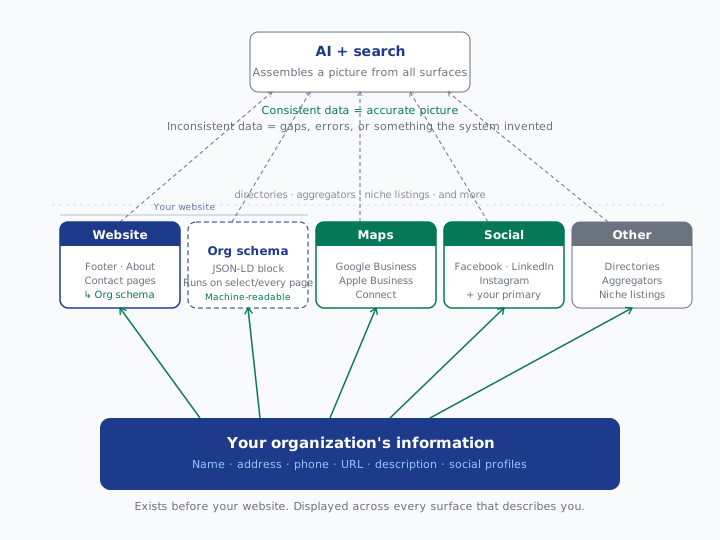
Your organization's information should be easy to find on your website — for people and for bots
Organization data should be clear and easy to find. If it's easy for people, it will be easy for the bots. A base level of information on an About Us page, which would include your mission statement right at the top, is a great starting point. Address information can be there on the About Us, or on a Contact Us page. If a local business where in person activity is important, moving one or both of these to the home page, and even including the address information in the persistent footer, is fabulous. Businesses and organizations with multiple locations have additional needs, with a starting point of a simple Locations page.
Google and other bots can and do read the data right from your webpages, and benefit from you defining the data well on the page. This is one of those areas where little things add up. Your address can be all over the site. But if it's not marked up in HTML as your address specifically, then it's just more data to figure out. And don't bury the information deep on a page, or make it necessary to hit a plus button or arrow to display it. Some crawlers cannot or will not do it.
Now your data is on your website, and for most businesses it is already there in one fashion or another. The next step is to "supercharge" the digestibility of this information by all of the different tools which crawl your site.
Organization schema gives search and AI a structured version of what's already on your site
Organization schema is not a shortcut. It will not move you to the top of search results by the end of the month. It won't make your ChatGPT question about "who is the best xxx" have you appear. What it does do, it provides a structured, machine-readable version of your organization's basic facts, delivered in a format that search crawlers and AI systems can read without guessing. It's a building block. Building it out well also sets a structure and discipline to use across your digital world.
Take a peek at how Google sees yours today. Go to Rich Results Test - Google Search Console. Put in your home page. You should see something like this from Apple's home page.
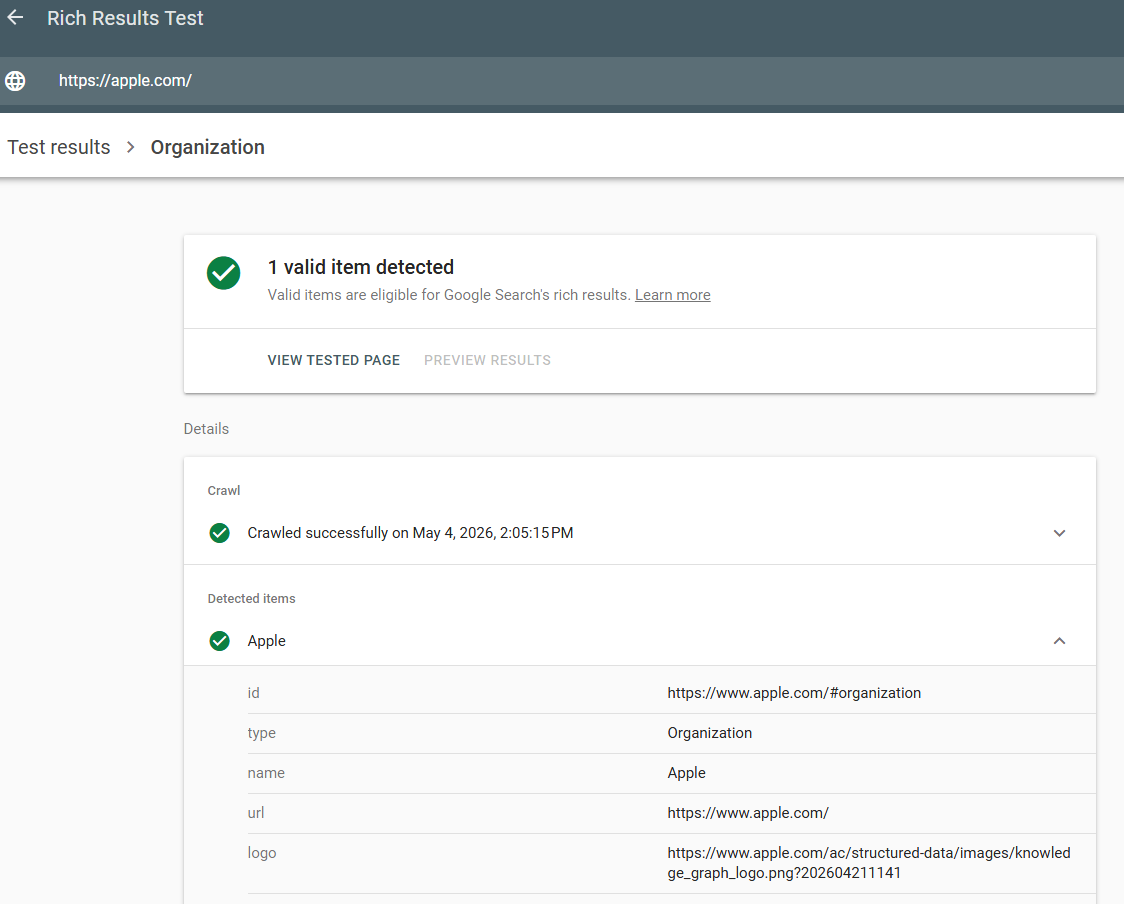
As you scroll through the results, you'll see phone numbers for Apple's support, for sales, links to social media profiles, etc.
Yes, bots can crawl your site and piece this together on their own. Schema speeds that process, reduces the margin for error, and does something crawling alone can't: it attaches your organization's identity to every page you place it on your site. At a minimum it is on your home page, contact us, about, and if you have one, a locations page. You can put it elsewhere but these are the key places.
Most midsized and larger organizations we have seen have a basic Organization schema. Small businesses who rely on basic website builders sometimes do not even have this. The drop off between "common" and a "good" level is surprisingly high. This is the opportunity for you to put out that phone number for your support team so that when someone searches for it, they find that versus your front desk. It's also a means to ensure the right logo is presented in overviews of your organization.
Where most organizations are today — and where to get to
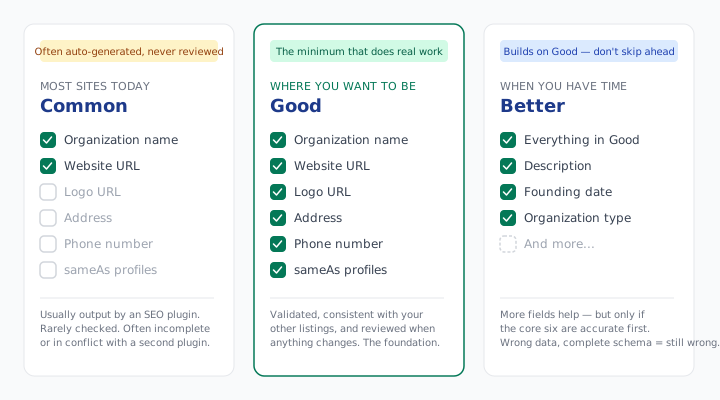
The fields that do the most work
The full Organization schema specifications at schema.org and Google run to dozens of properties. Most organizations will never need most of them. A DUNS number in your schema is not moving any needle for anyone reading this. The alternateName field, though, is a fabulous opportunity for you to connect all the variations of your name back to your website. You know, "Company XYZ" v "XYZ" v "XYZ Inc.".
These six are where to start:
name — Your organization's legal name, used consistently. P&G or Procter & Gamble. Chicago Randonneurs or Chicago Randonneurs, Inc. Pick one and use it everywhere. If you have alternate names, and most do, use the alternateName field as well.
url — The canonical version of your homepage. https with or without www — whichever you've committed to. Not both. If you have subdomains or other domains for support, sub-brands, subsidiaries, this is a great place to build a structure for that.
logo — Straightforward, and worth getting right. This is the image search engines and AI systems pull when they display your organization visually.
address and telephone — The most common source of inconsistency. One address, one primary phone number, used the same way everywhere. A toll-free number is fine. Three different numbers across three different platforms is not. If you want to drive different phone numbers to different teams, structure it here as well. Apple's site does a nice job here.
sameAs — Underused and high value. This is how you tie your schema to your external digital footprint in a structured way. Every social profile, your Wikipedia page if one exists, your Google Business Profile. List them here and you've told the system exactly where else to find you.
Before touching your schema, build a simple spreadsheet: one column for each field, one row for each surface where it appears — website, Google Business, Apple Business Connect, LinkedIn, Facebook, and any others relevant to your organization. If the data matches across every row, the picture the system assembles is the one you wrote. If it doesn't, you've just found your starting point.
If you want to build the JSON-LD block itself rather than editing one by hand, this Organization Schema Generator covers many of the fields above and outputs clean, copy-paste ready code.
What a complete organization schema looks like in practice
Here's the organization schema from a local cycling club I belong to, chicagorando.org, pulled directly from the Schema Markup Validator instead of Google. Both work, providing slightly different views.
| Property | Value |
|---|---|
| @type | SportsOrganization, Organization |
| @id | https://chicagorando.org/#organization |
| name | Chicago Randonneurs |
| url | https://chicagorando.org/ |
| sameAs | https://www.facebook.com/groups/chicagorando/ |
| sameAs | https://www.instagram.com/chicagorando |
| sameAs | https://www.strava.com/clubs/chicagorando |
| rba@chicagorando.org | |
| description | Chicago Randonneurs is a nonprofit cycling organization... |
| foundingDate | January, 2024 |
A few things worth noting: the @type field lists both SportsOrganization and Organization — schema.org allows stacking types when more than one applies, and specificity helps. The sameAs entries tie the organization to its actual social presence. The description is written to be extracted and cited, not just to fill a field.
Check your own site now on schema.org or Google. What do you see. What might be missing. If things are incorrect, that is a bit more urgent.
This is one surface — the rest need to match
Getting your organization data well set on your website and the associated schema right is the starting point, not the finish line. The same facts that live in your schema need to live consistently across every surface that describes you: Google Business Profile, Apple Business Connect, your primary social platforms, and the longer tail of directories and aggregators you may not even know are describing you.
Think beyond name, address, and phone. Your organization's description, founding story, leadership, and areas of focus — does your website tell that story clearly? If so, is it reflected in your schema? And is the same information used consistently across the digital surfaces you control?
There is a whole discipline around name, address, and phone management — auditing your listings, correcting inconsistencies, and building a process to keep them aligned as your organization changes. That's the next article. What you've built here is the canonical record to audit against.
FAQ
My SEO plugin says it handles schema — does it?
Yes and no. Most plugins generate a base level of organization schema automatically, and most of it isn't wrong — it's just incomplete, never reviewed, and occasionally in conflict with a second plugin doing the same thing. Paid versions of most plugins give you more control. The honest answer: don't take the plugin's word for it. Check the validator and see what's actually going out.
How do I know what my organizational schema looks like right now?
Take your homepage URL to two places: validator.schema.org and Google's Rich Results Test. The schema validator shows everything that's there. Google's tool shows what Google is reading and flags errors. Neither tells you what's missing — that's what the spreadsheet exercise above is for.
How do I add or fix organization schema on my platform?
It depends on where your site is built.
Organization Schema on WordPress: Yoast SEO and Rank Math both generate organization schema. Yoast handles it under SEO > Search Appearance > General. Rank Math under Titles & Meta > Local SEO. Both give you control over the core fields in their paid versions. The risk: there may be other plug ins or custom code providing some of this information. Walk through and see what is there today, and understand what is generating it first.
Organization Schema on Shopify: Shopify is strong out of the box for product schema. Organization schema is thinner — you'll need a third-party schema app or a developer to add a proper JSON-LD block to your theme's layout file.
Organization Schema on Squarespace: Squarespace's ease of use has its drawbacks and one of them is limited native schema control. Squarespace outputs basic structured data from its Business Info panel, but doesn't give you a clean way to edit or extend organization schema without injecting custom code under Settings > Advanced > Header Code Injection. Doable, but not designed for the users who frequently choose Squarespace. If you do make advanced edits, you may need to go into your Business Info panel and clear out the data there, otherwise there is a risk of providing duplicate information, which engines don't love.
Webflow: A strong native option for schema. Webflow's CMS and custom code blocks give you clean access to add and manage schema files at the page or site level. If you're on Webflow and haven't set this up, it's the most straightforward implementation path on this list.
Other CMS, and custom or headless sites: Add the schema JSON-LD block directly to your site's global layout template — the file that renders on every page, or targeted pages. One block, sitewide or page specific, no plugin required. No plugin updates to break it, no conflicts to manage.
How often does my organization data need to be updated?
Treat it as an annual review plus event-driven updates. New address, new phone number, rebrand, leadership change — update the schema the same day you update the website. Otherwise set a calendar reminder once a year to run the validator and check your listings. It takes twenty minutes and catches drift before it becomes a problem.
Who should be managing my organization data on my website?
The starting point is whomever is responsible for your website. That might be a marketing operations team or person, a web analyst, or whomever wears the Marketing hat on a given day. It could be an agency, and you could simply ask them to provide you reports of what the Google validator says on the 3-4 pages mentioned above. The spreadsheet approach will help ensure that the person doing the updates has a common place to share with whomever manages your social media platforms for sameAs, and is agreed to with a Brand person or team for the logo selection and mission statement, etc.
Want to discuss more about building a sustainable platform for getting discovered? Start with a conversation.
Related reading: Why AI Is Getting Your Organization's Information Wrong · The Person schema series