How Nonprofits Can Get Found in AI Search with the WordPress Tools They Already Have
By Ted Fay · March 26, 2026
Donors, volunteers, and community members are searching in ChatGPT, Google AI Overviews, and Bing Copilot, and getting AI-generated answers rather than a list of blue links to sort through. A nonprofit WordPress site that is not structured for those systems tends not to show up in those answers, and often it is relatively easy to get started on the journey to getting found.
A developer may have set up SEO tools like Yoast or Rank Math at launch, and a different one may have set up an event management plugin for your calendar of events. Both are capable of doing most of what is needed to improve online visibility, with an investment of time and focus. Getting the configuration of these tools up to date takes less time than it probably sounds like.
Before reading further, go to Google's Rich Results Test, enter your homepage URL, and look for Organization schema in the results. You want to see five fields present and valid: name, url, logo, description, and sameAs links to your social profiles. If those are green, you have a foundation. If Organization schema is missing or showing errors, that is the starting point.
On the events side, open ChatGPT, Gemini, or Google with AI Mode and search your organization name plus "events." If current events are surfacing with dates, descriptions, and links back to your site, your event configuration is doing its job. Either check failing is a place to start.
A word on schema and AI search
Google's own documentation on AI Overviews currently states that no special schema markup is required to appear in AI results, and that is accurate at the face of it. Modern crawlers, including Google's, can read a full page and extract meaning without structured data. The value of schema is not that it unlocks a door. It is that it reduces ambiguity: it tells crawlers definitively who your organization is, what your events are, and how the pieces relate to each other, rather than leaving those inferences to the crawler. That distinction matters more for organizations without deep link equity or years of indexed content, which describes most nonprofits. And if your nonprofit is part of an association, or closely tied to others, schema can help define to the bots what that relationship is. But more on this at a future date.
Anyone who tells you the mechanism is fully understood is overstating what the evidence shows. What we do know is that AI engines leverage organic search to get current and new information. Schema helps SEO as well. What I can say is that the pattern across the organizations I have worked with is consistent enough to act on, and the cost of the configuration described here is low enough that the directional evidence is sufficient. If you are looking to improve your results for the hottest fashion trend, there are likely other things you also need to address.
Yoast, Rank Math, and Event Plugins Can Handle Most of This. The Default Settings Often Don't.
Yoast SEO and Rank Math, and other tools, generate schema automatically once the site manager has configured the settings to do so. For Organization schema, this usually covers organization name, description, logo, and social profile links (or "sameAs"). These are free features in most of the plugins.
Event management plugins like The Events Calendar integrate directly with both SEO plugins and output Event schema on every event page, including event name, date, location, and pricing, without per-event work once the integration is active. Event name becomes part of what the schema outputs, so it is worth treating it as a public-facing descriptor rather than an internal shorthand. "Big Surprise" is not a great event name for this purpose. "Nonprofit X's Annual Member Meeting" is.
Default settings still need some attention. Not set correctly, they can show event schema on every page on your site that has a calendar plugin, even if the calendar is hidden. The bots can then become a bit confused as to which page has the authoritative information. Ensure that you are only showing schema on the event page itself. You may also need to adjust your robots.txt file to ensure that all the permutations of your calendar are not crawled. There is a real risk of Googlebot paging through every day, week, month, and year of your calendar and trying to index it. This uses up the crawl budget for your site and pollutes the index.
What correctly configured looks like
Chicago Randonneurs is a nonprofit cycling club whose website I've been lending my efforts to, and we moved chicagorando.org to WordPress earlier this year, with Rank Math and an event management plugin configured correctly from the start. The site is small, with plenty of room to grow on content, design, and navigation, and that is part of what makes it a useful reference point. It is a volunteer-run club site, not a polished marketing property, and it provides the answers people are looking for because the structured data foundation is in place.
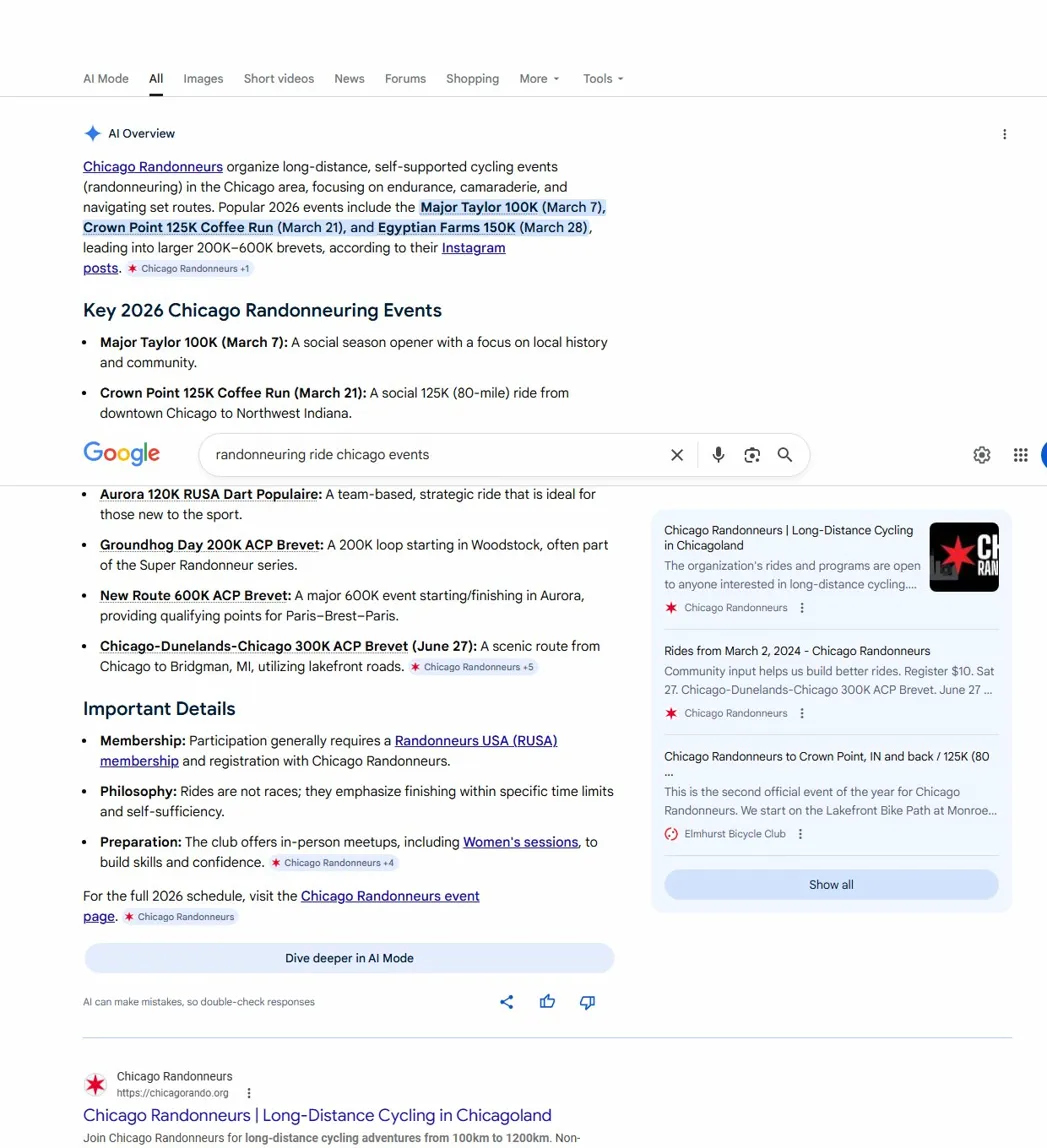
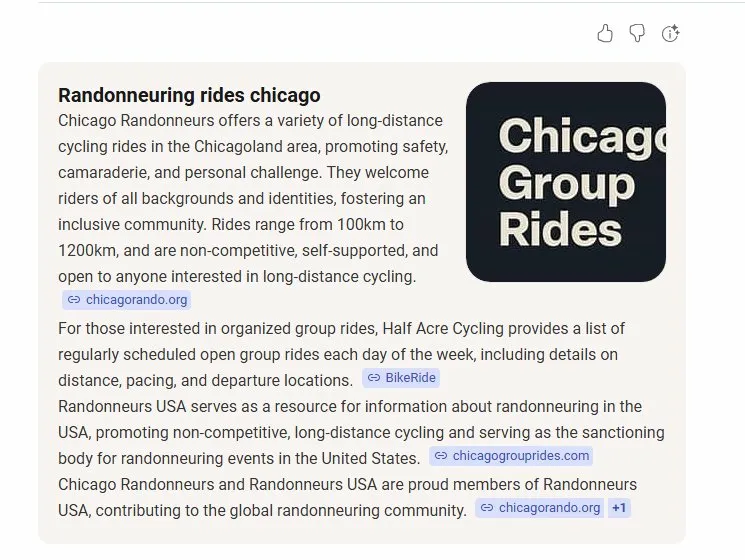
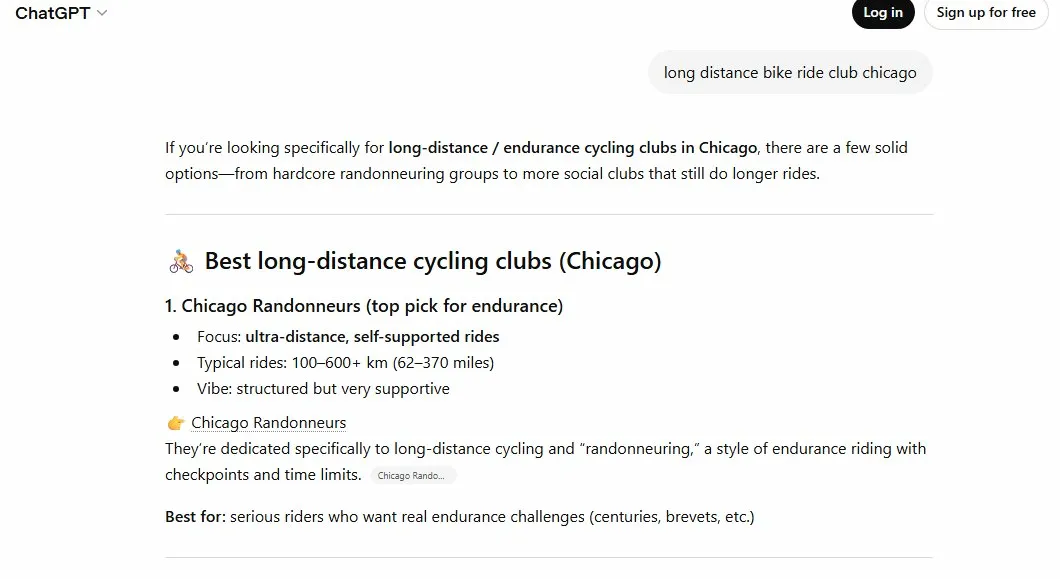
Within a few months of launch, Google AI Overviews were surfacing specific event names, dates, and pricing, with the RUSA membership requirement appearing unprompted from the organizational relationship data in the schema. Bing Copilot rendered a knowledge panel with logo and org description. ChatGPT returned Chicago Randonneurs as the top result for "long distance bike ride club chicago" with a direct citation to chicagorando.org. Upcoming events started appearing in AI-suggested results. Schema validated at zero errors, zero warnings on Google's Rich Results Test.
This is one data point, on a low-competition set of queries, on a site that has been live for a few months. A separate organization I work with implemented the minimum recommended configuration and went from not appearing in search results to ranking first for their primary query within a week, also in a low-competition market. The pattern is suggestive, not conclusive, and there is a lot more to search visibility than structured data configuration. It is a reasonable place to start.
A checklist to see where your nonprofit is for search readiness
Score each item 0 (not in place), 3 (partially configured), or 5 (fully set up). Maximum score is 30. This checklist covers Organization and Event schema. If you want to go deeper on the people behind your organization, the Person schema series covers that ground.
1. Organization schema present and complete Run the Rich Results Test on your homepage. Look for name, url, logo, description, and sameAs. All five present and valid: 5. Some present, some missing: 3. Not there: 0.
2. SEO plugin installed Yoast or Rank Math active on your WordPress site: 5. Installed but setup wizard not completed: 3. Not installed: 0.
3. Knowledge Graph configured In your SEO plugin, the Organization name, description, logo, and social profile links are filled in completely: 5. Partially filled in: 3. Default or empty: 0.
4. Event plugin outputting Event schema Run the Rich Results Test on a single event page. Event schema present with name, date, location, and pricing: 5. Schema present but incomplete: 3. No schema on event pages: 0.
5. Event plugin integration with SEO plugin active In your SEO plugin settings, the event plugin integration is confirmed active: 5. Plugin present but integration not verified: 3. Not checked: 0.
6. robots.txt blocking event plugin parameter URLs Disallow rules in place for calendar parameter URLs: 5. Partial rules: 3. No rules: 0.
25-30: The foundation is in place. The next layer is content depth and entity relationships, and there is more to build on from here.
12-24: Clear opportunities. Organization schema and Knowledge Graph configuration have the highest return and the lowest effort, so start there.
Under 12: Start with the SEO plugin setup and Knowledge Graph. Everything else builds on that.
There is a lot more to search visibility than what is described here, and the checklist is a starting point rather than a finish line. If any of what it surfaces feels like more than you want to work through on your own, that is the kind of work 2 Find Marketing does.
If you want to see what one nonprofit site looks like in AI search, including upcoming events, search for Chicago Randonneurs long-distance cycling Chicago. You should find us. And if you want to come ride, we would love to have you. The rides are long and the company is good.
Ted Fay is the founder of 2 Find Marketing and, in his non-consulting hours, helps run Chicago Randonneurs. About Ted